Commission Reconciliation: How to Audit and Fix Payout Errors
Commission reconciliation is the process of verifying payout accuracy before reps get paid. Here's a step-by-step process for catching errors before they become disputes.
Commission reconciliation is the step between calculating commission and paying it — the verification pass that catches errors before they reach a rep's statement.
Most sales ops teams do some version of this. Few do it systematically. According to a 2018 Xactly and OpenSymmetry study of more than 200 companies, 60% of organizations don't track commission accuracy at all. Which means they don't catch errors until reps file disputes — after finalization, after payroll has run, and after the correction process becomes a multi-week headache.
This guide explains what commission reconciliation involves, when to do it, and how to build a process that catches errors when they're still easy to fix.
What commission reconciliation actually means
Commission reconciliation is the process of verifying that payouts match what the plan specifies.
That sounds obvious. In practice, it means checking several things that can go wrong independently:
- Deal-level accuracy: Were the right deals included? Are the amounts correct? Were deals credited to the right rep?
- Rate application: Did the correct plan version apply? Were accelerator thresholds calculated correctly?
- Period accuracy: Did the period cutoff work cleanly? Are there deals that belong to the prior period that slipped in?
- Total reconciliation: Does the sum of all rep statements equal the expected total payout?
A commission run can look fine at the individual statement level and still have an aggregate error — for example, if a deal was credited to two reps simultaneously due to a data issue. The total reconciliation check catches what individual statement reviews miss.
Why skipping reconciliation is expensive
The cost of a commission error depends on when you catch it.
Caught during a draft review (before finalization): the correction takes a few minutes. Update the deal, recalculate, done.
Caught after finalization, before payroll: the correction requires a payout adjustment and updated statements. Takes a few hours.
Caught after payroll runs: the correction requires a reversal, a manual adjustment, communication to the rep, and possibly an explanation to finance. Takes days, sometimes longer if the rep disputes the correction itself.
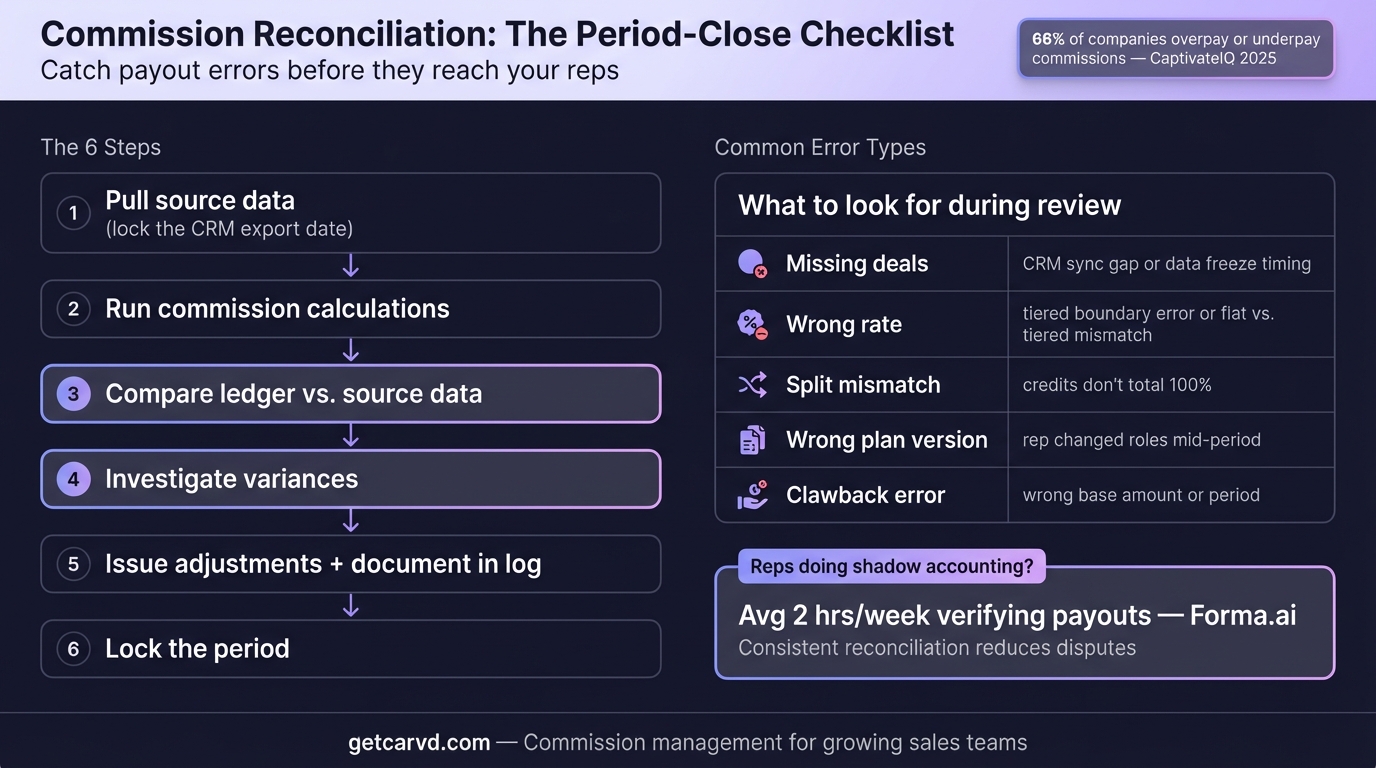
CaptivateIQ's 2025 State of Incentive Compensation Management Report found that 66% of companies experienced commission overpayments or underpayments in the prior year. The same report found that 93% of sellers manually verify their commission statements. That's the cost of an unreliable process: every rep spending time checking their own math instead of selling.
The two-stage reconciliation process
Commission reconciliation is most effective as a two-stage process, with a rep-facing review and a finance-facing review at different points in the payout cycle.
Stage 1: Draft review (5-7 days before finalization)
Send reps a preliminary statement labeled as a draft. Give them 48-72 hours to flag issues.
What reps should check:
- Are all closed deals included?
- Are deal amounts correct?
- Is the credited rep on each deal accurate?
Reps know their deals. They'll catch missing or wrong amounts faster than any automated check, because they remember what closed in the period. The draft review converts reps from after-the-fact complainants to pre-finalization reviewers — which is far cheaper for everyone.
The draft review should be read-only for reps. Flagging goes to sales ops to investigate. Don't let reps edit their own statements; let them report discrepancies.
Stage 2: Finance reconciliation (day before payout)
This is the internal check that happens after the draft review is resolved and before payout runs.
Checks to run:
Total payout verification. Sum all rep payouts. Compare against the commission budget for the period. A discrepancy doesn't necessarily mean an error (accelerators can drive payouts above budget), but an unexpected discrepancy warrants investigation before payment.
Rep-count check. Verify that every active rep who should have a statement has one. Missing statements are easy to miss in individual reviews.
Zero-payout review. Pull every rep with a $0 payout. For reps who had any closed deals in the period, $0 is almost certainly an error — either their deals weren't included or there's a crediting problem.
Large-variance check. Compare each rep's payout to their prior period and their quota-adjusted expected payout. A rep who should be at roughly $12,000 and got $1,200 or $120,000 is worth a second look.
Period boundary check. Confirm the deal pull cutoff is documented and no deals updated after that time are included. If any did, decide whether to include them (in this period or next) and document the decision.
Common issues found during reconciliation
Deals missing from the pull
The most common cause is a deal that closed after the data export. Lock the export time before starting the calculation, document it, and communicate it to reps so they know when deals need to be in the CRM to count for the period. Importing deals via CSV deal import with a documented cutoff timestamp creates a clean snapshot that both sales ops and reps can reference.
Wrong rep credited
Usually happens when a deal's CRM ownership changed after close — a rep reassignment, a deal transferred to an account manager, or an ownership cleanup that happened to include active commissions. The fix is checking the deal owner at time of close, not at time of export.
Plan version mismatch
If a plan was updated mid-year, verify which version applies to each period. Plans with clear effective dates in the document make this straightforward. Plans described as "the Q3 changes" without a documented effective date create ambiguity.
Accelerator calculated on total revenue instead of marginal revenue
If a rep's plan pays 8% below quota and 12% above quota, the 12% rate should apply only to revenue above the threshold — not to all revenue. Applying accelerated rates to total revenue is the most expensive type of commission error. A rep who finishes at 120% of quota on a $300,000 quota with a $1M deal: the correct calculation applies 12% to $100,000 (the amount above quota), not $1,000,000.
For a full breakdown of how to calculate tiered plans correctly, see Tiered Commission Structure: How to Build One That Scales.
Draws not tracked across periods
For teams using draw against commission, reconciliation needs to include the current draw balance for each rep. A rep who had a $5,000 advance last period should have that deducted from this period's payout before finalization. Draw balances that aren't tracked create overpayments that may or may not be recoverable. A commission spreadsheet template with a running draw-balance column prevents the most common tracking gaps in manual processes.
Building a reconciliation checklist
A reconciliation process is only consistent if it's documented. Build a checklist that runs every payout period:
Data preparation
- Deal data exported at documented cutoff time
- Cutoff communicated to sales team before period end
- No deals updated after cutoff included in run
Draft review
- Draft statements sent to all active reps
- Review window communicated (deadline for flagging issues)
- All flagged issues investigated and resolved before finalization
Finance reconciliation
- Sum of all rep statements matches total payout budget (or variance is explained)
- All active reps have a statement
- Zero-payout reps with closed deals reviewed
- Large variances from prior period reviewed
- Draw balances applied correctly
Post-finalization
- Finalized statements distributed to reps
- Disputes received, logged, and assigned
- Error count and dollar value recorded for accuracy tracking
The last item matters more than it seems. If you track how many corrections you make each period and how much they're worth, you'll see whether your process is improving. Most teams that start tracking commission accuracy find their error rate in the first period, then improve it measurably over the next two or three cycles. Solutions like Sales Cookie and Commissionly automate parts of this reconciliation, though many teams at the 5-to-25-rep scale find a lighter-weight tool covers their needs.
How transparency changes the reconciliation equation
The hardest part of commission reconciliation is investigating errors after they're flagged. "My commission is wrong" is not actionable. "Deal X is missing and Deal Y shows $48,000 but I closed it at $52,000" is.
Rep-facing statements that show deal-level detail — which deals were included, which rate applied, any adjustments — convert vague disputes into specific, fixable issues. The reconciliation conversation changes from "something is wrong" to "here's the deal and here's the discrepancy."
Carvd generates rep statements with deal-by-deal breakdowns, so reps can see exactly how every payout was calculated. That transparency shifts most reconciliation work from post-finalization disputes to pre-finalization catches during the draft review — when fixing errors takes minutes instead of days.
Related reading
Last updated: March 22, 2026