Commission Errors: The Most Common Mistakes (And How to Prevent Them)
83% of companies have commission inaccuracies. Here are the most common commission errors, why they happen, and how to prevent them without rebuilding your process from scratch.
Commission errors are common. According to a 2018 Xactly and OpenSymmetry study of more than 200 companies, 83% have commission payment inaccuracies, with an average error rate above 5%. CaptivateIQ's 2025 State of Incentive Compensation Management Report found that 66% of companies experienced an overpayment or underpayment in the past year.
That's not a software problem or a spreadsheet problem specifically — it's a process problem. The same errors appear whether you're calculating commissions in Excel or in a purpose-built tool. The difference is how hard they are to catch.
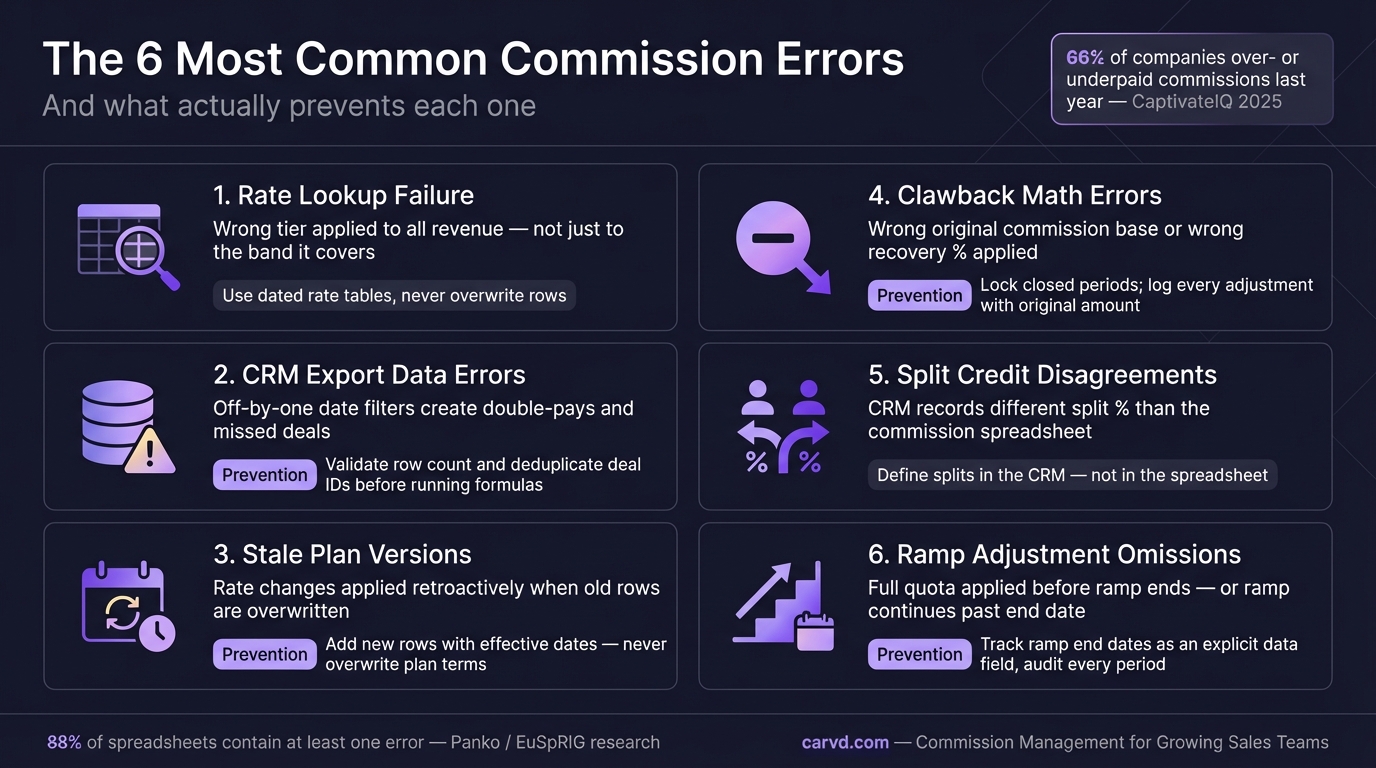
Why commission errors happen
Most commission errors trace back to one of three root causes:
Ambiguous plan documents. When the plan doesn't define what revenue base is used, when a deal gets credited, how splits work, or what happens to multi-year contracts, different people calculate the same deal differently. The math isn't wrong — the inputs are contested.
Manual data handling. Copy-pasting deal data from CRM into a spreadsheet, then applying formulas manually, introduces errors at every step. A transposed number, a missed row, a formula that doesn't extend to the bottom of the range — these are quiet errors that often go undetected for full pay periods.
No reconciliation before payout. Many companies finalize commission runs without a structured review step. The calculation goes out, reps receive their statements, and errors surface as disputes — after the fact, when fixing them requires reversals and corrections that take more time than a pre-payout review would have.
The Xactly/OpenSymmetry study found that 60% of organizations don't track the accuracy of their commission payments at all. Without measurement, errors accumulate undetected.
The most common commission calculation errors
1. Wrong deals credited to the wrong rep
Deal crediting errors happen when the rep on a closed deal doesn't match who's in the commission run. Common triggers: a rep leaving mid-quarter and deals getting orphaned, territory changes applied inconsistently, or CRM owner fields not matching the plan's crediting rules.
In team-selling environments — where SDRs, AEs, and account managers may all receive credit on the same deal — crediting errors multiply. If the split rules aren't spelled out precisely, you'll frequently find commission credited to the person who last touched the deal in the CRM, not the person the plan intends to pay.
2. Stale or missing deal data
A commission run is only as accurate as the deal data feeding it. If a deal closes on the last day of the period and the rep doesn't update the CRM until two days later, it may not appear in the commission calculation. If a deal was updated after the data was pulled for the calculation, the payout reflects the old amount.
This is especially problematic in organizations that export CRM data manually and run commission calculations separately. The export timestamp matters — and it's rarely documented. Using a CSV deal import with a locked cutoff date creates a snapshot that both sales ops and reps can reference when disputes arise.
3. Plan changes applied to the wrong period
Mid-year plan changes are common: quota resets, rate adjustments, territory expansions. The error occurs when a change effective on a specific date is applied retroactively to prior periods, or when a new plan version is applied before its effective date.
A simple example: a rep's rate increases from 8% to 10% starting Q3. If the commission calculation applies the 10% rate to June deals (Q2), the rep is overpaid. If the 8% rate carries into July (Q3), the rep is underpaid. Without a versioned plan document and clear effective dates, both errors happen regularly.
4. Accelerator thresholds calculated incorrectly
Accelerators — higher commission rates that kick in above quota — are among the most error-prone elements of any commission plan. The calculation errors usually come from two places:
- Cumulative vs. marginal application. If a rep hits 110% of quota and the plan pays 12% above 100%, does the higher rate apply to all revenue, or only to the revenue above quota? Most tiered plans intend the latter. Applying the accelerated rate to all revenue overpays significantly.
- Quota period mismatch. Annual quotas with monthly payouts require prorating. If a rep is measured against an annual quota but paid monthly, the accelerator threshold calculation for each month requires careful handling — and it's frequently wrong.
See the tiered commission structure guide for formulas that handle both cases correctly.
5. Clawback adjustments not applied
When a customer churns or cancels within the clawback period, the rep's commission on that deal is subject to recovery. Clawback errors happen in both directions: applying a clawback to a deal that doesn't qualify (wrong cancellation reason, outside the clawback window) or failing to apply a clawback to a deal that does.
The failure-to-apply error is more common, and more expensive. Without a systematic process for monitoring active deals during their clawback window, many recoverable commissions simply don't get recovered. This is a real cost: if your average deal is $48,000 with a 10% commission and you miss two clawbacks per quarter, that's $9,600 per quarter in unrecovered payouts.
See Commission Clawback: When to Use Them for how to structure a recoverable clawback process.
6. Draws not properly tracked or recovered
Draw against commission plans — where reps receive an advance against future earnings — require tracking both the draw balance and the recovery schedule. Commission errors in draw plans usually look like:
- Draws advanced but never tracked for recovery
- Recovery applied in the wrong period
- Non-recoverable draws being treated as recoverable (or vice versa)
For more on draw plans, see Draw Against Commission: How It Works.
What commission errors actually cost
A 5% error rate sounds small. On a $1M annual commission budget, it's $50,000 in misallocated payouts per year. For a $10M budget, it's $500,000.
But the financial cost is only part of it. The operational cost is significant too:
Disputes. Every error that reaches a rep becomes a dispute — or a quiet decision by the rep to accept the wrong number and start maintaining their own tracking spreadsheet. CaptivateIQ found that 93% of sellers manually verify their commission statements. That's time spent not selling.
Rep trust. Only 26% of sellers report that they fully trust their commission is always calculated correctly (CaptivateIQ, 2025). Trust, once lost, affects how reps respond to plan changes, quota conversations, and quota attainment. Reps who don't trust their compensation process engage differently with it — and not in a good way. A dispute resolution workflow with an audit trail gives reps a structured way to raise concerns — and gives sales ops a faster path to resolving them.
Sales ops time. Disputes, corrections, and reconciliation after finalization consume sales ops hours that could be spent on analysis, planning, or process improvement. Palette HQ's 2023 survey of 130 sales leaders found that 56% regularly deal with commission errors — and that figure doesn't capture the time spent resolving them.
How to prevent commission errors
Define crediting rules precisely in the plan document
Every source of errors in crediting traces back to ambiguity. The plan should define: which CRM field determines deal ownership, what happens when ownership changes, how splits are allocated between overlapping roles, and what revenue base is used (contracted amount, invoiced amount, collected cash, or ARR equivalent).
Ambiguous language like "deals will be credited to the rep who closed them" is a dispute waiting to happen. "Deals are credited to the CRM opportunity owner as of 11:59 PM on the last day of the commission period" is not.
Lock the data pull before running the calculation
Choose a cutoff time for deal data, document it, and don't move it after the calculation starts. If a deal updates after the cutoff, it belongs in the next period. Consistency eliminates a category of errors entirely.
Run a draft before finalizing
Send reps a preliminary statement five to seven days before finalization. Label it as a draft. Ask reps to flag any missing deals or incorrect credits. Most errors surface here — and catching them before finalization takes minutes. Catching them after finalization takes days.
This step alone reduces post-finalization disputes significantly. The deals are fresh, the rep remembers them, and the corrections are straightforward. A dispute filed three weeks after pay is processed is much harder to resolve. Rep dashboards that show deal-level detail during the draft window make this review self-service — reps catch their own missing deals instead of waiting for sales ops to investigate.
Track commission accuracy as a metric
If 60% of organizations don't measure commission accuracy, they can't improve it. Start tracking: how many corrections were made after the initial run, the dollar value of those corrections, and how many disputes required manual resolution. Quarter-over-quarter improvement in those numbers is a leading indicator that the process is working.
Build a reconciliation step into the process
Before finalizing any commission run, verify that the sum of all individual rep statements equals the total company payout. If they don't match, something is wrong — find it before it goes to payroll. This reconciliation catches formula errors, missed adjustments, and data-pull inconsistencies that individual statement reviews might miss.
The transparency fix
Most commission errors that surface as disputes could have been caught at the calculation stage — if the rep had visibility into how their number was derived.
A payout total that's wrong is much harder to dispute than a deal-level statement where the wrong amount or the wrong deal is visible. When reps can see that Deal X was credited at $42,000 instead of $48,000 — or that Deal Y was credited to the wrong rep — they can flag it with specifics.
Tools like Carvd calculate commissions at the deal level and generate rep-facing statements that show every deal, every rate applied, and every adjustment. That visibility doesn't eliminate errors, but it does ensure they get caught before finalization rather than after.
Related reading:
Last updated: March 22, 2026