Commission Tracking Software: The Complete Buyer's Guide (2026)
How to evaluate commission tracking software, compare 7 tools honestly, and choose the right fit for your team size and plan complexity.
Most sales teams calculate commissions in spreadsheets. It works—until the team grows past 10-15 reps, the comp plan gets its third variable, or a disputed payout triggers a two-day back-and-forth with finance.
Commission tracking software replaces that process with automated calculation, deal-level transparency for reps, and a structured review workflow before anything goes to payroll. According to CaptivateIQ's 2025 State of Incentive Compensation Management Report, 85% of reps manually verify their own commissions because they can't see how their number was calculated. That shadow accounting is a symptom of a broken process—not a broken software tool.
This guide covers what commission tracking software actually does, what to look for when evaluating it, and how 7 tools compare honestly—including pricing, best fits, and real limitations.
What commission tracking software does
At its core, commission tracking software handles four things:
Data ingestion. The software pulls deal data from your CRM (or via CSV upload) and feeds it into your commission calculation. This replaces the error-prone export-and-paste step that accounts for a significant share of commission inaccuracies.
Plan logic application. Your comp plan rules—flat rates, tiered thresholds, accelerators, per-product rates, splits, clawbacks—are encoded once and applied consistently every period. No formula drift, no range extension errors.
Rep-facing statements. Reps see a deal-level breakdown showing which deals were credited, at what amount, and which rate applied. This is the visibility that reduces disputes. CaptivateIQ's 2025 report found only 26% of sellers fully trust their commission is calculated correctly—transparency is the fix.
Audit trail and approvals. Every adjustment, approval, and plan change is logged. Disputes are resolvable in minutes with the original data set.
What it doesn't do: fix ambiguous plan documents, clean bad CRM data, or solve plan design problems. Software applies rules consistently—it doesn't compensate for poorly defined rules. See commission errors for the root causes that persist even with automation.
When to move beyond spreadsheets
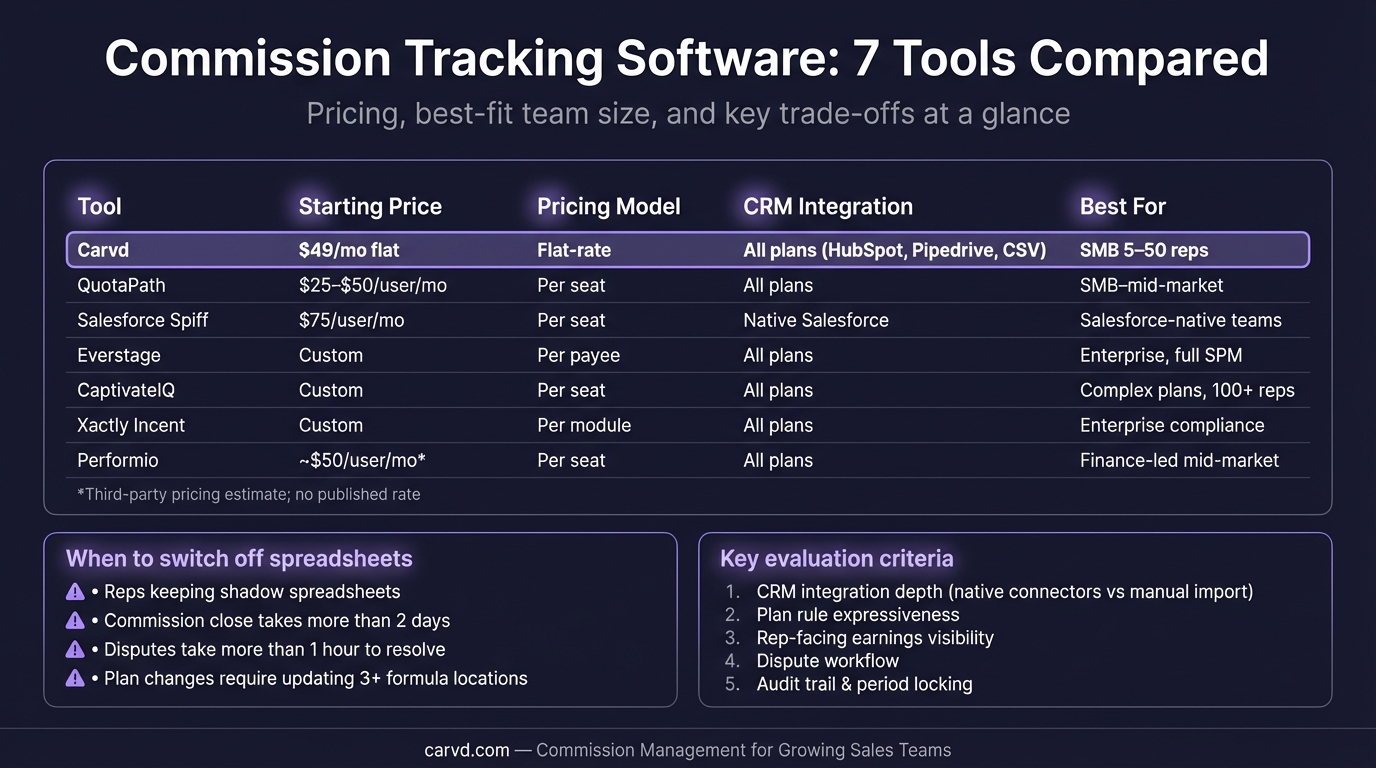
A spreadsheet works fine for 5 reps on a flat commission rate. The case for software becomes compelling when:
- Your monthly commission run takes more than 2-3 hours
- You're running 3+ plan types with different rates or thresholds
- Reps are regularly asking how their numbers were calculated
- You've had to correct a payout after finalization
- Plan changes require restructuring the spreadsheet rather than editing a plan config
According to CaptivateIQ's 2025 report, compensation teams spend an average of 89 hours per month on commission calculations, approvals, and error corrections when the process is largely manual. That's more than two full work weeks. For most teams, software pays for itself quickly—not on features, but on recovered time.
If you're not sure whether you're at that inflection point, read Commission Automation: When Spreadsheets Stop Scaling.
What to look for: 8 evaluation criteria
1. Time to first commission run
How fast can you go from contract to running your first commission period? Some tools require weeks of implementation support. Others let you encode your plan and import your first period in under an hour.
For teams with standard comp plans (flat rate, simple tiered structures, no territory overlays), fast setup should be achievable. For enterprise teams with complex MBO components and multi-currency requirements, longer implementations are expected.
2. CRM integration depth
Native integrations with Salesforce, HubSpot, or Pipedrive matter more than you'd expect. Real-time sync means reps see their updated earnings as deals close. Daily batch sync (which some tools use) means the dashboard is stale for hours at a time.
If your CRM isn't on a tool's native integration list, check whether CSV import is a viable fallback—for many teams, it is.
3. Plan flexibility
Can the tool handle your actual comp plan? Use the commission plan builder to map your current structure before demos. Test specifically:
- Tiered accelerators above quota — does it apply the accelerated rate to marginal revenue above quota, or to all revenue? Most plans intend the former; some tools do the latter.
- Per-product rates — if you pay different rates on different products or services, verify this is supported.
- Commission splits — multi-rep credit sharing for team-selling or SDR/AE hand-off structures.
- Clawback rules — automated recovery when customers cancel within a defined window.
See Commission Formulas: Every Plan Type with Examples for the plan types to test against.
4. Rep transparency
Do reps have real-time access to their earnings with a deal-level breakdown? This is the single biggest driver of rep trust and the primary reducer of shadow accounting. A payout total without a breakdown is nearly as opaque as no software at all.
Look for: earnings dashboard accessible to reps, deal-level statement showing amount, rate, and any adjustments, and a draft review step before finalization.
5. Pricing model and total cost
Per-seat pricing scales in a straight line as your team grows. Flat-rate pricing stays constant. Per-payee pricing charges for everyone who receives a commission, including managers.
The advertised rate is often not the full cost. Watch for:
- Platform fees — some tools charge a monthly platform fee on top of per-seat pricing
- Onboarding fees — implementation costs can run $500 to tens of thousands depending on the tool
- Professional services dependencies — if plan changes require going through the vendor's services team, that's an ongoing cost
- Minimum user requirements — some tools have minimums of 10+ users
6. Dispute workflow
Can reps flag discrepancies within the platform, with context attached? Does the dispute route to the right approver? Is there an audit trail of the resolution? Carvd's dispute resolution workflow handles this with a structured flag-review-resolve process and a full audit log.
Without a structured dispute workflow, disputes happen via email or Slack—harder to track, harder to resolve consistently.
7. Payroll and finance integrations
Can you export a payroll-ready file? Carvd's payroll export generates CSV and PDF formats ready for finance. Does the tool integrate with your payroll processor (ADP, Rippling, Gusto)? If your company is subject to ASC 606, does the tool support commission expense amortization reporting?
For most teams, a clean CSV export is sufficient. For larger finance teams, direct integrations save meaningful reconciliation time.
8. Self-serve plan management
Can RevOps or Finance make plan changes without submitting a support ticket? Self-serve plan management is standard in SMB-focused tools. Some enterprise tools require going through a professional services team for anything beyond basic changes—build that cost into your evaluation.
7 commission tracking tools compared
Carvd
Pricing: Flat-rate. Starter $49/month (up to 10 reps, 2 plans), Growth $99/month (up to 25 reps, unlimited plans), Scale $199/month (unlimited reps and plans). Annual billing saves roughly 33%.
Best for: Sales teams of 5-50 reps who have outgrown spreadsheets but find enterprise ICM tools over-engineered for their needs. Strong fit for teams importing from HubSpot, Pipedrive, or CSV.
Setup time: Under 1 hour for standard plans.
What it does well: Flat-rate pricing means cost doesn't scale with headcount. Rep dashboards show the full deal-level breakdown—every deal credited, rate applied, and adjustment made. Disputes are handled in-platform with an audit trail. Payroll-ready CSV export.
What it doesn't do yet: Multi-currency commissions, territory overlays, complex MBO components, or API access at lower tiers. If you have 100+ reps with layered hierarchy structures, Carvd isn't the right fit.
Plan types supported: Flat rate, tiered, per-product, accelerators, splits.
QuotaPath
Pricing: Transparent and publicly listed. Essential at $25/user/month (annual), Growth at $40/user/month, Premium at $70/user/month. Platform fee covers the first 5 users and setup. Free trial of the Growth tier available.
Best for: SMB to lower mid-market (10-100 reps). Sales-led teams who need fast time to value and are primarily on Salesforce or HubSpot.
What it does well: One of the few tools with fully transparent, self-serve pricing. Fast implementation—typically 2-6 weeks. Strong rep-facing UX. Earnings estimator lets reps forecast their payouts before close.
What it doesn't do well: ASC 606 compliance is gated to the Growth tier. Less suited for highly complex enterprise structures. Per-seat pricing adds up at larger team sizes.
Honest acknowledgment: QuotaPath's rep earnings estimator is genuinely useful for rep motivation—it lets reps see projected commission as they work a deal, which most other tools don't offer at this price point.
Visdum
Pricing: Growth at $15/user/month (up to 50 sellers, annual), Dynamic at $30/user/month (up to 100 sellers), Scale at custom pricing.
Best for: Mid-market SaaS teams of 20-100 reps who want a tool purpose-built for SaaS compensation structures.
What it does well: Strong price-to-feature ratio, especially at $15/user. SaaS-native design means the tool understands ARR-based quotas, renewal commissions, and SaaS-specific metrics. Commission estimator for reps.
What it doesn't do well: Explicitly built for SaaS—less suited for non-SaaS industries. Smaller vendor with limited brand recognition. The Scale tier (100+ reps) reverts to custom pricing.
Honest acknowledgment: For SaaS companies specifically, Visdum's plan templates are among the most relevant out of the box, which reduces setup time meaningfully.
ElevateHQ
Pricing: Publicly listed with a platform fee. Basic at $30/user/month + $250/month platform fee (HubSpot, Pipedrive, Zoho), Professional at $35/user/month + $350/month platform fee (adds Salesforce, QuickBooks, Xero, Stripe), Enterprise at $40/user/month + $400/month platform fee (adds NetSuite, ASC 606). As of March 2026.
Best for: SMB to lower mid-market (15-75 reps) who need broad CRM and financial system integrations without enterprise pricing.
What it does well: Low-code commission designer with pre-built plan templates. Wide integration ecosystem—both CRM and financial systems in a single tool. Real-time support via Slack and phone.
What it doesn't do well: The platform fee is a meaningful overhead cost for small teams (a 10-rep team pays $300-$750/month in platform fees alone before per-seat charges). No self-serve trial—demo required to get started.
Honest acknowledgment: ElevateHQ's financial system integrations (QuickBooks, Xero, NetSuite) are broader than most SMB-focused tools. If accounting reconciliation is a pain point, that's a genuine differentiator.
CaptivateIQ
Pricing: Quote-based. No public pricing. Industry sources (Vendr, Coefficient) report approximately $55/user/month, with implementation and managed services packages adding meaningfully to total cost. Integration platform add-on reported at approximately $11,000/year.
Best for: Mid-market to enterprise (50-500+ reps). Teams with complex comp structures that have outgrown simpler tools.
What it does well: Spreadsheet-like formula logic that RevOps teams already understand—the learning curve is lower than tools that require learning a proprietary syntax. High plan flexibility. Strong reporting and audit trail.
What it doesn't do well: Per-seat pricing at reported rates becomes expensive quickly. Implementation typically requires professional services support. Plan changes often go through the account team rather than self-serve. Not cost-effective for teams under approximately 25 reps.
Honest acknowledgment: CaptivateIQ's formula-based approach is genuinely powerful for complex enterprise plans. If your comp plan has territory overlays, quota adjustments, and multi-dimensional crediting rules, CaptivateIQ handles it more naturally than most alternatives. Their 2025 State of ICM Report is also one of the best public resources on commission operations benchmarks—worth reading regardless of whether you buy the product.
Salesforce Spiff
Pricing: Listed at $75/user/month. External system connectors at $250/connector/month. As of March 2026.
Best for: Enterprise teams already deep in the Salesforce ecosystem. Particularly strong when sales data, account management, and commission calculations all need to live in one system.
What it does well: Native Salesforce integration means deal data, rep data, and commission calculations live in one place—no syncing, no exports. Enterprise-grade automation. Real-time rep-facing commission visibility.
What it doesn't do well: At $75/user/month, cost is prohibitive for most SMB teams. Non-Salesforce shops lose the core value proposition. Implementation is not self-serve. Being absorbed into the broader Salesforce product suite creates some roadmap uncertainty for standalone users evaluating it.
Honest acknowledgment: For a 100-rep team running entirely in Salesforce, Spiff's native integration genuinely reduces operational overhead. The data never leaves the CRM environment—for companies with strict data governance requirements, that matters.
Xactly Incent
Pricing: Quote-based. Industry reports suggest approximately $40-$60/user/month for the core Incent module, with significant third-party implementation costs. As of March 2026.
Best for: Large enterprise (300+ reps). One of the oldest ICM platforms, with 20 years of proprietary compensation benchmarking data.
What it does well: Scales to tens of thousands of payees. 100+ out-of-the-box reports. AI-powered plan optimization trained on 20 years of compensation data. Deep compliance and audit capabilities.
What it doesn't do well: High total cost of ownership makes it impractical for teams under approximately 300 reps. Complex to configure and maintain—advanced changes typically require admin training or professional services. Long implementation timelines. Steep learning curve.
Honest acknowledgment: For enterprise companies that need to model plan design changes against historical performance data, Xactly's benchmarking data set is genuinely unique. No other tool in the market has that depth of proprietary compensation data. That's worth something at scale—just not at the price for smaller teams.
Pricing comparison at a glance
| Tool | Pricing model | Starting cost | Transparent pricing? |
|---|---|---|---|
| Carvd | Flat-rate | $49/month (up to 10 reps) | Yes |
| Visdum | Per-user | $15/user/month | Yes (2 of 3 tiers) |
| QuotaPath | Per-user | $25/user/month | Yes |
| ElevateHQ | Per-user + platform fee | $30/user/month + $250/month fee | Yes |
| Xactly Incent | Per-user (quote) | ~$40-$60/user/month (reported) | No |
| CaptivateIQ | Per-user (quote) | ~$55/user/month (reported) | No |
| Salesforce Spiff | Per-user | $75/user/month | Partial |
Pricing as of March 2026. Per-seat costs may exclude platform fees, onboarding costs, and implementation support.
How to choose based on team size and complexity
5-15 reps, standard comp plans: Flat rate, one or two tiered structures, no territory overlays. A spreadsheet might still be viable—but commission spreadsheet alternatives are worth evaluating for rep transparency alone. Carvd or QuotaPath's Essential tier are natural fits.
15-50 reps, 2-4 plan types: This is where spreadsheets reliably break. Multiple plan types, potential splits, accelerators, and clawbacks create the complexity that makes manual calculation error-prone. Carvd (flat-rate), QuotaPath (Growth), or Visdum (Dynamic) are all reasonable options—evaluate based on CRM integration needs and plan types.
50-200 reps, SaaS business: At this size, rep transparency, dispute workflows, and ASC 606 compliance start mattering more. QuotaPath Premium, Visdum Dynamic/Scale, ElevateHQ Professional, or CaptivateIQ become more relevant. Evaluate whether per-seat pricing at this range remains cost-competitive.
200+ reps, complex enterprise structures: Territory overlays, multi-currency, quota hierarchy, complex MBO components, compliance requirements. CaptivateIQ, Salesforce Spiff (for Salesforce shops), or Xactly Incent are the right category. Expect implementation timelines of months, not weeks.
What the evaluation process should look like
Before sending RFPs or starting demos, do three things:
1. Document your actual plan rules. List every comp plan type you currently run—flat rates, tiered thresholds, per-product rates, accelerator percentages, any split rules. This is the stress test you'll use during demos. A tool that can't model your actual plan isn't the right tool regardless of other features.
2. Export one period of historical data. Pull a clean export from your CRM with deal amount, close date, rep name, and product. During the evaluation, load this data into each tool and verify that the calculated output matches your manual calculations. Discrepancies reveal plan modeling limitations.
3. Have a rep test the rep-facing experience. Ask one rep to review a draft statement in the tool before you commit. Rep adoption depends on the statement being clear, credible, and accessible. If the rep can't understand their own statement, shadow accounting continues regardless of what tool you've purchased.
Making the switch
For a team of 15-50 reps moving from spreadsheets, the transition typically takes one to two pay periods:
Period 1: Run both systems in parallel. Load your deal data, encode your plan, and compare outputs line-by-line against your existing calculation. Discrepancies reveal either data mismatches or plan encoding errors.
Period 2: Move to the new system as primary, with spreadsheet as spot-check. Send draft statements to reps before finalizing. Most remaining issues surface here.
Period 3+: Close the books in the new system. The spreadsheet gets archived.
The parallel-run period is the most important step. Don't skip it to save time—catching plan encoding errors before going live is far cheaper than correcting a full-team payout after finalization.
See Commission Reporting: What Sales Ops Actually Needs for the metrics worth tracking once you're running in the new system.
The transparency dividend
Commission tracking software isn't just about calculation efficiency. The more durable value is transparency.
When reps can see exactly how their payout was derived—which deals were credited, which rate applied, any adjustments made—three things happen: shadow accounting drops, dispute volume falls, and trust in the comp process increases. CaptivateIQ's 2025 data found that only 50% of companies give reps real-time visibility into their earnings. The 50% that do have a structural advantage in rep retention and selling time.
Carvd was built specifically for this: every commission run generates a deal-level statement for each rep, showing exactly how their number was calculated. Setup in under an hour, flat-rate pricing that doesn't penalize you for growing your team.
Related reading
- Commission Automation: When Spreadsheets Stop Scaling
- Commission Errors: The Most Common Mistakes (And How to Prevent Them)
- Commission Reporting: What Sales Ops Actually Needs
- Commission Formula: Every Plan Type, With Examples
- Commission Spreadsheet: Free Template + When to Upgrade
- ASC 606 Commission Accounting: What Sales Ops Needs to Know
- How to Calculate Sales Commission: Formulas + Examples
Last updated: March 22, 2026