Commission Tracker Template: Excel vs Software (How to Choose)
Decide between a commission tracker template in Excel and commission software. Covers what templates include, where they break, and when to make the switch.
A commission tracker template in Excel or Google Sheets is the right tool for a lot of sales teams. For 5 reps on a flat rate with a clean CRM export, it works fine. The question is whether your situation is actually that simple — and whether it stays that way.
This post covers what a useful commission tracker template includes, how to build one, and where Excel consistently breaks down compared to dedicated commission software.
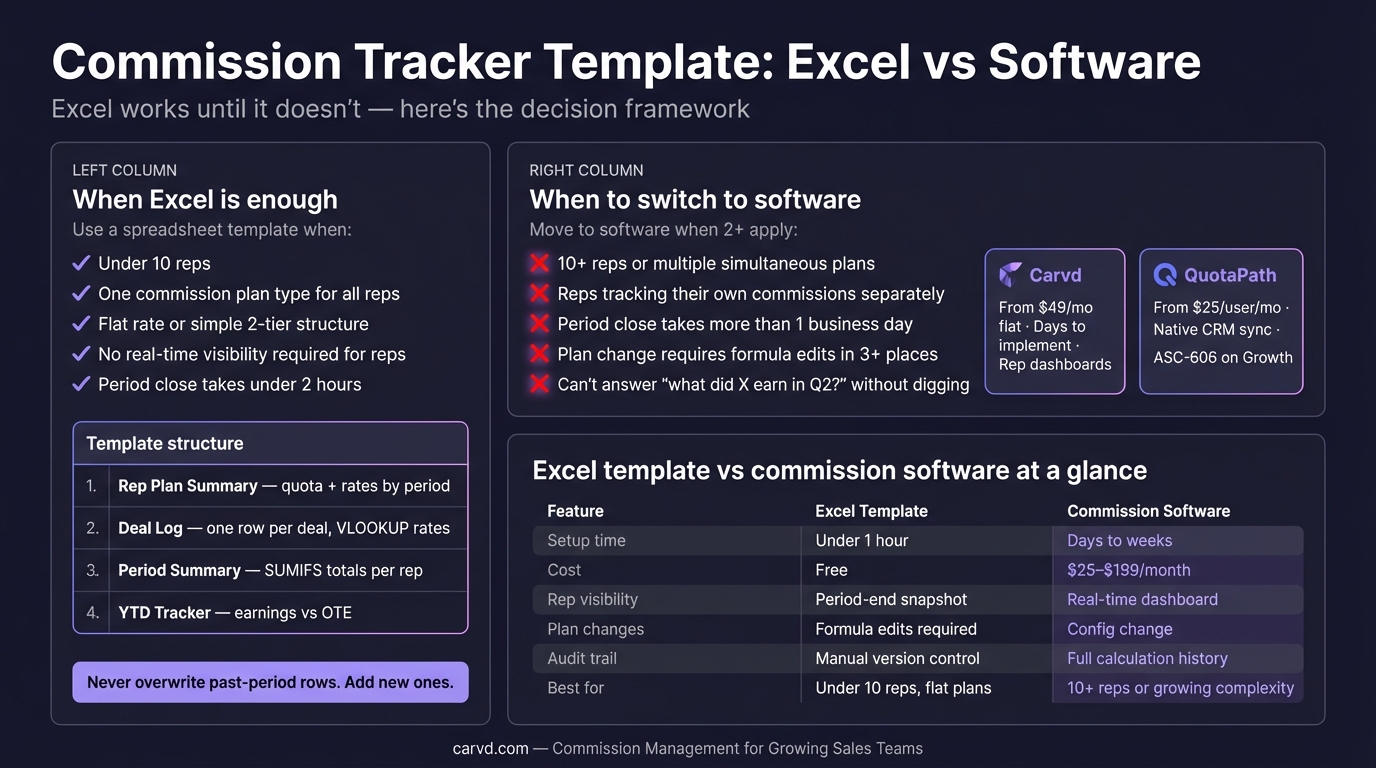
What a commission tracker template actually needs
A commission tracker is not the same thing as a commission calculator. A calculator applies a rate formula to a deal amount. A tracker maintains a verifiable record of what every rep earned, across every period, under whatever plan was active at the time.
That distinction matters because the places tracking fails are different from the places calculation fails. You can have perfectly correct formulas and still have unusable tracking if you've overwritten historical rates, lost prior-period data, or can't reconstruct a payout from six months ago.
A functional commission tracker template needs four components:
1. Rep plan summary — one row per rep per period. Quota, commission rate(s), ramp percentage, and any plan-specific notes. This is the reference table that all commission calculations look up against. Never overwrite a prior-period row; add a new one.
2. Deal log — one row per closed deal. Rep name, close date, recognized revenue, deal split percentage, and a lookup key that pulls the correct commission rate from the plan summary by rep + period. No hardcoded rates.
3. Period summary — one row per rep per period, showing total revenue, quota attainment, and total commission earned. Built with SUMIFS from the deal log, or with a pivot table.
4. Adjustment column — a place to record clawbacks, mid-period corrections, and ramp adjustments. These should be entered in the current period, not as edits to historical rows.
That's the whole template. The rest is formatting.
How to set up the deal log formula
The most common failure in Excel commission trackers is using rep name alone as the VLOOKUP key. When a rep's rate changes for Q2, VLOOKUP finds the first match for that rep name — which may return Q2's rate for Q1 deals. Every payout from Q1 recalculates incorrectly.
The fix: concatenate rep name and period into a single lookup key.
Plan key (deal log): =B2&" | "&D2    → "Marcus Webb | Q1 2026"
Plan key (rep summary): =A2&" | "&B2  → "Marcus Webb | Q1 2026"
Your commission rate lookup then uses this key:
=VLOOKUP(G2, RepSummary!$I:$J, 2, 0)
Where column I in the Rep Summary is the concatenated key and column J is the commission rate. Historical deals always pull the correct period's rate, regardless of what changes happen later.
For tiered plans, the rate lookup needs to return the right tier based on quota attainment at the time the deal was credited. See commission formulas for every plan type for the full tiered formula structure.
When a commission tracker template works
A spreadsheet template handles commission tracking reliably when:
- Under 10 reps — few enough rows that input errors are easy to spot
- One plan type — everyone on the same structure, no exceptions for role, product, or region
- Flat or simple tiered rates — a three-tier plan is about the limit before formula maintenance becomes its own job
- Stable quotas — mid-year quota adjustments can be handled with a new plan summary row, but they create complexity
- No real-time visibility requirement — reps receive a period-end payout statement; they don't need live earnings tracking
If your team fits this profile, a spreadsheet template is a reasonable choice. For a polished Excel template, check Stackrows or download the commission spreadsheet template. The four-tab structure above gives you a fully functional tracker in under an hour. For a more detailed build guide including the full tiered formula, see commission spreadsheet: free template + why you'll outgrow it.
Where Excel commission trackers consistently break
Concurrent edits. Google Sheets handles this better than Excel, but neither prevents two people editing the same row simultaneously. The last save wins, silently. For period-close workflows where ops and finance are both updating data, this creates reconciliation risk.
Plan changes that touch multiple rows. When a new product is added mid-year with different commission rates, or a rep transfers to a different territory with a new quota, the correct approach is adding new plan summary rows. In practice, most teams edit existing rows — which breaks historical calculations.
Shadow accounting. When reps start tracking their own deals in a personal spreadsheet to verify their payout, the tracker has already failed. Shadow accounting is a signal that reps don't trust the numbers — usually because they've been told their payout and can't verify the derivation. The spreadsheet doesn't show its work in a way reps can check.
The two-business-day close. If reconciling commissions for a period close takes more than one full day, the spreadsheet has become a liability. That time cost accumulates: at 12 closes per year, a two-day reconciliation is 24 days of ops time dedicated to spreadsheet maintenance.
Audit questions. "What did Jordan earn in Q2 last year?" is a reasonable question to answer from commission records. If the answer requires digging through previous sheet versions, checking email history, or reconstructing from payroll exports — the tracker doesn't actually work as a record of truth.
Excel commission tracker vs commission software
| Excel template | Commission software | |
|---|---|---|
| Setup time | Under an hour | Hours to days (sometimes weeks) |
| Cost | Free | $25–$199/month |
| Rep visibility | Period-end statement or shared sheet | Real-time earnings dashboard |
| CRM sync | Manual export + paste | Automated sync |
| Plan changes | Formula edits | Config change |
| Audit trail | Manual version control | Full calculation history |
| Concurrent edits | Risk of silent overwrites | Controlled access by user role |
| Dispute resolution | Hours to reconstruct | Click to show derivation |
| Clawback tracking | Manual row additions | Structured workflow |
| Best for | Under 10 reps, flat or simple plans | 10+ reps or growing plan complexity |
The cost crossover for most teams is between 10 and 15 reps. A 12-rep team spending 6 hours per period close on spreadsheet reconciliation — at a $90K loaded ops cost — is spending roughly $200 per close in labor. Most commission software for that team size costs less than that per month. Carvd's commission calculator replaces those manual formulas with one-click calculation across all reps and plan types.
Commission software built for teams moving off spreadsheets
If the template has hit its limits, here are the tools designed for that transition:
Carvd — flat-rate pricing at $49/month (up to 10 reps), $99/month (Growth, up to 25 reps), and $199/month (Scale, unlimited reps). Starter and Growth plans accept a CSV export of closed-won deals — same data you'd paste into the spreadsheet, but with automatic calculation and rep-facing dashboards. Scale adds Salesforce and HubSpot sync. Honest limitation: no multi-currency support and no ASC-606 compliance tooling. Teams that need either should evaluate QuotaPath or CaptivateIQ instead.
QuotaPath — $25–$50/user/month (as of early 2026) with native Salesforce and HubSpot integration at all paid tiers, no connector surcharge. The Growth tier adds ASC-606 compliance. Per-seat pricing scales linearly — a 30-rep team runs $750–$1,500/month depending on tier. Earnings forecasting for reps reduces shadow accounting.
Salesforce Spiff — $75/user/month (as of early 2026), built natively into Salesforce. Non-Salesforce CRM connections run $250/month per connector. Teams on HubSpot or other CRMs pay the connector fee on top of per-seat pricing; teams fully on Salesforce don't.
For a full comparison across seven commission platforms — including pricing, feature matrices, and best-for summaries — see best commission management software: 2026 comparison.
The practical decision
A commission tracker template in Excel is a starting point, not a scalable system. It's the right call until it isn't — and the signals that tell you it's time to switch are usually visible before the real damage hits.
Three questions that tell you which side you're on:
- Can any rep verify their commission calculation without emailing ops? If no, the tracker has a trust problem — rep dashboards solve this.
- Does the period close require more than one business day of reconciliation work? If yes, the tracker has a cost problem.
- Have you had a commission dispute that took more than 30 minutes to resolve? If yes, it will happen again.
Two or more yes answers mean the template is already costing more than software would.
Related reading
- Commission tracking software: buyer's guide (2026) — evaluation criteria when you've outgrown the spreadsheet
- Commission spreadsheet: free template + why you'll outgrow it — detailed four-tab build guide with tiered formulas
- Commission tracking spreadsheet template — the full column structure and VLOOKUP formula reference
- Commission formulas for every plan type — flat, tiered, unit-based, and margin-based formulas with worked examples
- Commission software for small business: what actually works — tool comparison for teams under 50 reps
Last updated: March 22, 2026