Sales Commission Calculator: Calculate Any Plan Type Instantly
Free sales commission calculator for flat rate, tiered, base + commission, splits, and rate-finder. Includes formulas, worked examples, and industry benchmarks.
Calculating commission shouldn't require a finance degree. But for most sales teams, it does — because comp plans have tiers, splits, accelerators, and base components that interact in ways a basic calculator can't handle.
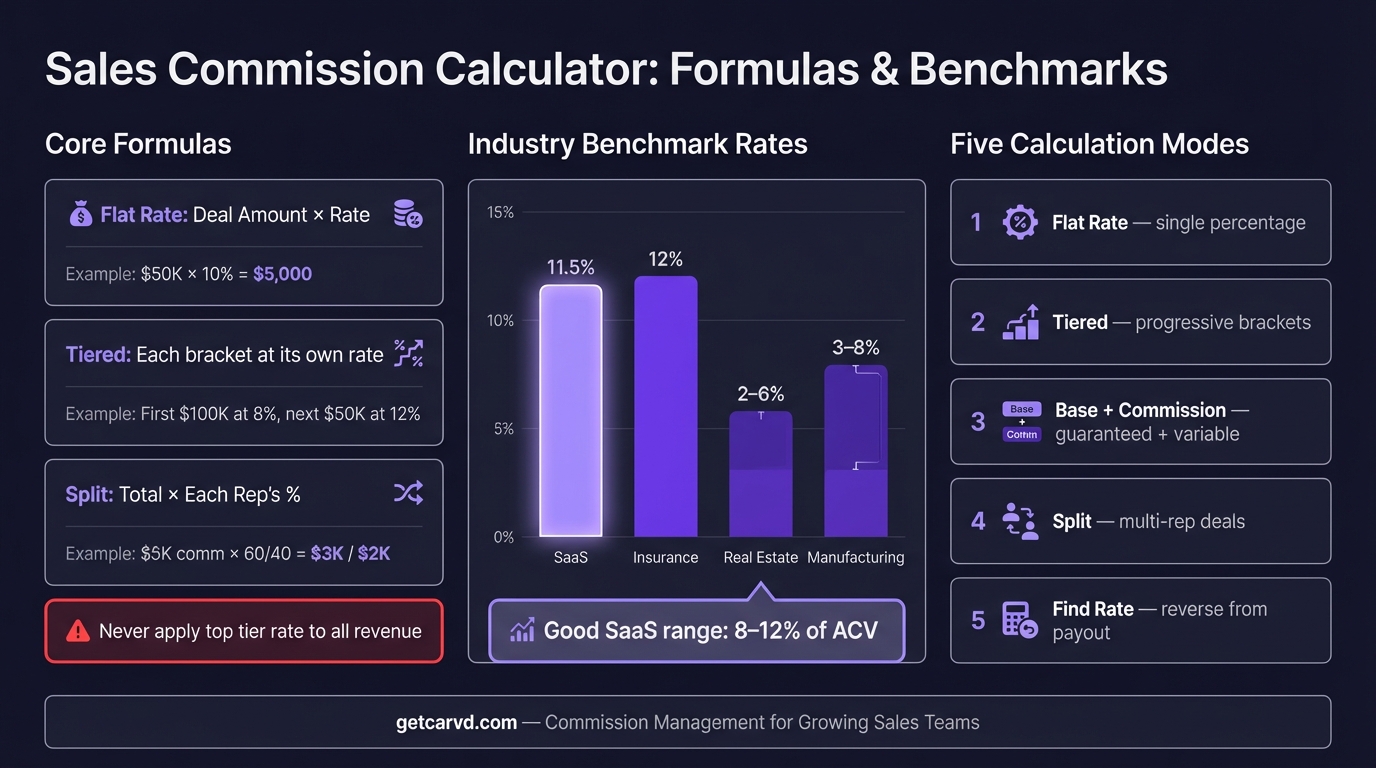
Carvd's free commission calculator handles five calculation modes in one place: flat rate, tiered, base + commission, deal splits, and commission rate finder. No signup, no spreadsheet. Enter your numbers and get the answer.
This guide walks through how to use each mode, the formulas behind them, and the industry benchmarks that tell you whether your rate is on market.
How to use the commission calculator
The calculator at /tools/commission-calculator has five modes. Select the one that matches your plan type:
| Mode | Use when you want to... |
|---|---|
| Flat Rate | Calculate commission at a single percentage |
| Tiered | Calculate commission across revenue brackets |
| Base + Commission | Calculate total comp including base salary |
| Split | Divide commission between two reps |
| Find Rate | Reverse-calculate your commission percentage |
Each mode shows the formula it uses and produces a single, verifiable number. The calculation runs instantly — no submit button, no email required.
Flat rate commission calculator
The simplest plan: one rate, all revenue.
Formula:
Commission = Deal Amount × (Rate ÷ 100)
How to use it: Enter the deal amount and commission rate. The calculator returns commission earned.
Worked example:
- Deal amount: $75,000
- Commission rate: 10%
- Commission: $75,000 × 0.10 = $7,500
Flat rate plans are the easiest for reps to verify independently. A rep can check the number in seconds with any calculator. That matters: the Bridge Group's 2024 SaaS AE Metrics & Compensation Benchmark Report found that the median commission rate for SaaS AEs is 11.5% of ACV — at that rate, a $100,000 deal produces $11,500 in commission, a number any rep can confirm in 10 seconds.
Where flat rate plans fall short is above-quota performance. A rep who closes 150% of quota earns proportionally the same rate as one at 80%. That's why most growth-stage companies eventually move to tiered plans with accelerators.
For more on choosing between flat and tiered structures, see the sales commission structure guide.
Tiered commission calculator
Tiered plans pay increasing rates as revenue crosses defined thresholds. The critical rule: each rate applies only to revenue within that tier.
Formula:
Tier commission = Revenue in tier × Tier rate
Total commission = Sum across all active tiers
How to use it: Enter your revenue tiers (floor, ceiling, rate) and the deal amount or period revenue. The calculator splits the revenue across tiers and sums the results.
Worked example:
- Tiers: $0–$50K at 8%, $50K–$100K at 12%, above $100K at 15%
- Period revenue: $130,000
| Tier | Revenue in tier | Rate | Commission |
|---|---|---|---|
| First $50,000 | $50,000 | 8% | $4,000 |
| $50,001–$100,000 | $50,000 | 12% | $6,000 |
| Above $100,000 | $30,000 | 15% | $4,500 |
| Total | $130,000 | — | $14,500 |
The most common tiered commission error is applying the top-tier rate to all revenue: 15% × $130,000 = $19,500 — an overpayment of $5,000. The calculator applies cumulative tiering correctly by default.
With accelerators: If your plan has an accelerator above quota (e.g., 1.5x on revenue above $100K), the above-quota commission is:
Above-quota commission = (Revenue − Quota) × (Base rate × Accelerator)
For a 10% base rate with a 1.5x accelerator on $30,000 above quota:
$30,000 × (0.10 × 1.5) = $30,000 × 0.15 = $4,500
For a dedicated tiered calculator with accelerator modeling, see the tiered commission calculator (Tiered mode in the main tool).
Base salary plus commission calculator
For reps on a salary + variable plan, total compensation combines a fixed base with performance-based commission.
Formula:
Total comp = Base Salary + (Deal Amount × Rate ÷ 100)
How to use it: Enter your annual base salary, the commission rate, and either period revenue or annual quota. The calculator returns total compensation at that performance level.
Worked example:
- Base salary: $80,000
- Commission rate: 10%
- Annual revenue: $600,000
- Commission: $600,000 × 0.10 = $60,000
- Total comp: $140,000
The base-to-variable split tells you how much of your income is at risk. For SaaS AEs, a 50/50 split (half base, half variable) is standard at 100% quota attainment. SDRs and BDRs typically see 60/40 or 70/30 — more guaranteed income because their influence on deal outcomes is indirect.
Evaluating a job offer: If a company posts "$200K OTE," that's base + variable at 100% quota, not base salary alone. Use the calculator to reverse-engineer what the base and quota must be: if OTE is $200K and the base is $100K, you need $100K in variable, which at a 10% rate requires $1M in annual quota.
For OTE-specific calculations — including quota-to-OTE ratio and how realistic OTE targets look by role — use the OTE calculator.
Commission split calculator
When two reps share credit on a deal — typically an SDR and AE, or a primary and overlay rep — the commission splits based on agreed percentages.
Formula:
Rep A commission = Total deal commission × Split A%
Rep B commission = Total deal commission × Split B%
How to use it: Enter the deal amount, commission rate, and split percentages. The calculator returns payout for each rep.
Worked example:
- Deal amount: $100,000
- Commission rate: 10%
- Total commission: $10,000
- Split: 80% AE / 20% SDR
| Rep | Split | Commission |
|---|---|---|
| AE (primary) | 80% | $8,000 |
| SDR (sourcing) | 20% | $2,000 |
| Total | 100% | $10,000 |
Common split structures by role:
| Split | Typical use case |
|---|---|
| 80/20 | AE + SDR on sourced deals |
| 70/30 | Co-sells between two AEs |
| 50/50 | Shared territory or overlay sales |
| 100/0 | Solo deal, no SDR sourcing credit |
The commission split post covers when and how to split deal credit, including territory overlays and team selling scenarios.
Commission rate finder (reverse calculator)
If you know what you earned and the deal size, but not the effective rate — or if you're trying to back into a rate from a target payout — the find-rate mode reverses the standard formula.
Formula:
Rate = (Commission Earned ÷ Deal Amount) × 100
How to use it: Enter the commission amount earned and the deal amount. The calculator returns the implied commission percentage.
Worked example:
- Commission earned: $8,500
- Deal amount: $85,000
- Implied rate: ($8,500 ÷ $85,000) × 100 = 10%
When this is useful:
- Checking whether your pay stub matches your plan document
- Auditing historical payouts before moving to new software
- Calculating effective rate across a period: total commission ÷ total revenue
- Verifying that a payout includes or excludes a specific deal
The effective rate check — total commission paid ÷ total revenue — is the fastest signal that your plan is calibrated correctly. At 11.5% median (Bridge Group 2024), an effective rate consistently above 14% suggests overpayment or a misconfigured accelerator. Below 8% may signal a plan that isn't rewarding strong performance.
Commission rate benchmarks by industry
The right commission rate depends on your industry, deal size, and sales cycle length. Use these benchmarks to check whether your rate is market-competitive.
| Industry | Typical range | Average |
|---|---|---|
| SaaS / Software | 5–15% | 10% |
| Insurance | 5–20% | 12% |
| Advertising / Media | 5–20% | 12% |
| Staffing / Recruiting | 10–25% | 18% |
| Telecom | 4–12% | 8% |
| Medical Devices | 3–10% | 6% |
| Manufacturing | 3–8% | 5% |
| Financial Services | 1–10% | 5% |
| Real Estate | 2–6% | 3% |
Industries with longer sales cycles and larger average deal values tend to have lower percentage rates — because the absolute dollar payout is still significant on a 3% rate applied to a $500,000 deal.
For a full breakdown including role-specific rates (SDR vs AE vs manager) and OTE benchmarks, use the commission rate benchmarks tool.
When a calculator is enough — and when it isn't
A calculator handles one-off calculations well. It breaks down in three situations:
Multiple reps, multiple plan types. If you have 12 reps across three comp plans, you're running 12 separate calculations per pay period. That's manageable in month one. By month six, when one rep switched plans mid-quarter and another has a ramp deal, the calculation tree becomes a spreadsheet problem — and spreadsheets introduce errors at scale.
Tiered plans with quarterly resets. A tiered plan recalculates from zero at the start of each period. That sounds simple until you're three months in and need to audit whether Q1's tier 2 threshold was applied to period revenue or cumulative revenue. Manual calculations don't have an audit trail.
Disputes. When a rep says $9,200 and payroll says $8,600, a calculator can't show you which deals were included, which rate applied to which revenue tranche, or why the numbers diverged. Dispute resolution requires deal-by-deal attribution — something a calculator can't produce.
Finance teams managing commission calculations manually spend 10+ hours per month on the process, according to data from commission management platforms. At that point, the cost of the manual process — in time, errors, and rep trust — exceeds the cost of a software solution. If you're not ready for software, the commission spreadsheet template provides a structured starting point that reduces common formula errors.
Carvd automates calculations from your CRM data via CSV deal import or native integrations, shows reps the exact deal-by-deal breakdown behind every payout through rep dashboards, and gives sales ops a one-click commission run instead of a monthly spreadsheet rebuild.
Related commission calculators and tools
This calculator covers the core calculation modes. For specific scenarios, these tools go deeper:
- OTE Calculator — Calculate on-target earnings from base salary and commission, model attainment scenarios, and evaluate job offers
- Commission Plan Builder — Model flat, tiered, and draw plans and see OTE projections at 80%, 100%, and 120% attainment
- Commission Rate Benchmarks — Look up typical rates by industry and role and compare against market data
Related guides:
- Commission Formula: Every Plan Type, With Examples — Reference formulas for flat, tiered, per-product, accelerator, draw, and clawback plans
- How to Calculate Sales Commission — Step-by-step walkthrough for complex multi-plan calculations
- Tiered Commission Structure — Design guide for building tier thresholds and accelerators
- Commission Split — When and how to split deal credit between reps
- Sales Commission Structure — Full guide to every commission structure type with examples
Last updated: March 22, 2026