Commission Split Calculator: Divide Deal Credit Fairly
Free commission split calculator for SDR/AE splits, co-sells, and overlay pairings. Includes formulas, common split percentages, and worked examples.
Splitting commission between two reps is straightforward when both contributions are clear and the percentages are agreed on in advance. The math is simple: total commission × each rep's percentage.
The hard part is defining the right split structure before deals close — so reps aren't negotiating credit after the fact.
Carvd's free commission calculator includes a split mode that calculates commission payouts for two reps in seconds. Enter the deal amount, commission rate, and split percentages, and the tool returns each rep's payout.
This guide covers how to use the split calculator, the formulas behind it, and the split structures used most often by sales teams.
How to use the split mode
Open the commission calculator and select the Split mode.
Enter three inputs:
| Input | What to enter |
|---|---|
| Deal amount | Total contract value or recognized revenue |
| Commission rate | The applicable percentage from the comp plan |
| Split percentages | Each rep's share (must total 100%) |
The calculator returns:
- Total commission on the deal
- Commission for rep A (primary)
- Commission for rep B (secondary)
No signup required. The calculation runs instantly.
Commission split formula
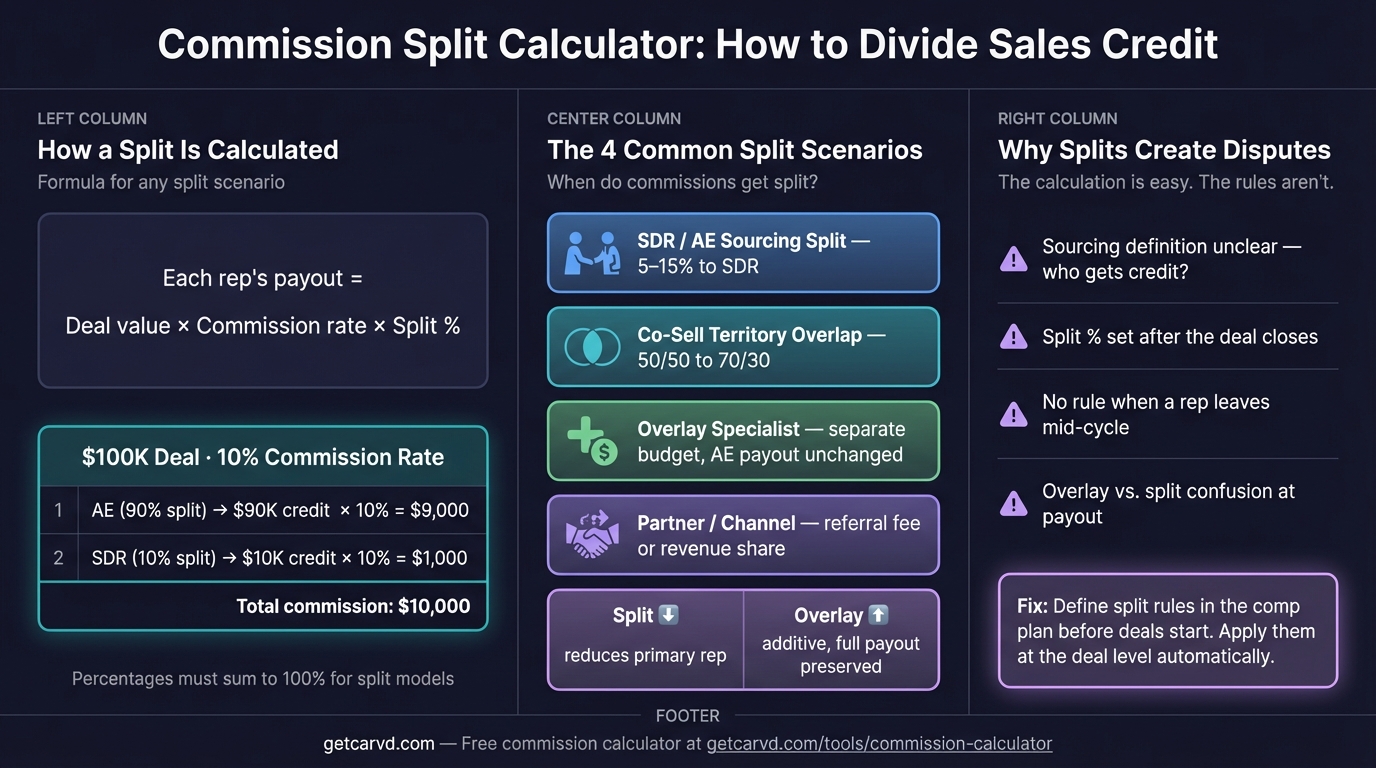
The formula for a two-rep split:
Total commission = Deal Amount × (Commission Rate ÷ 100)
Rep A commission = Total commission × (Split A% ÷ 100)
Rep B commission = Total commission × (Split B% ÷ 100)
Worked example:
- Deal amount: $120,000
- Commission rate: 9%
- Total commission: $120,000 × 0.09 = $10,800
- Split: 80% AE / 20% SDR
| Rep | Split | Commission |
|---|---|---|
| AE (primary) | 80% | $8,640 |
| SDR (sourcing) | 20% | $2,160 |
| Total | 100% | $10,800 |
Both percentages must total 100% for a revenue split. If they don't, someone is being over- or under-credited.
Common commission split structures
SDR / AE splits
The most common split in B2B SaaS. The SDR sources or qualifies the lead; the AE closes the deal.
| Split | Use case |
|---|---|
| 80/20 (AE/SDR) | Standard for outbound-sourced deals |
| 75/25 (AE/SDR) | Higher SDR credit for complex qualification cycles |
| 85/15 (AE/SDR) | Lower SDR credit for inbound or marketing-sourced leads |
The SDR's split typically applies to the first-year ACV only, not renewals. If your plan credits SDRs on expansion revenue, document that explicitly — it becomes a dispute source when accounts grow.
Co-sell / two AE splits
When two AEs share responsibility on a single account or territory:
| Split | Use case |
|---|---|
| 50/50 | Equal contribution (joint territory, true co-sell) |
| 70/30 | One AE led the deal; other supported |
| 60/40 | Named account + regional rep pairing |
50/50 splits sound fair but create friction when one rep did more of the work. A 70/30 or 60/40 structure, agreed upfront, reduces post-close negotiation. You can codify these defaults directly in a comp plan builder so splits are applied automatically rather than negotiated deal by deal.
Overlay specialist splits
Overlay specialists — solutions engineers, technical sales, or industry specialists — are typically handled through double crediting rather than revenue splits.
Revenue split vs. double crediting:
- Revenue split: The $10,000 commission is divided. AE gets $7,000, SE gets $3,000. Total payout: $10,000.
- Double crediting: Both the AE and the SE each receive 100% commission on the deal. Total payout: $20,000.
Double crediting costs more — the company pays commission on more than the deal's actual value. But it removes the incentive problem: neither rep has to give up their commission to involve the other.
Most companies use revenue splits for same-role pairings and double crediting for overlay specialists. Which structure you use changes whether split percentages need to total 100%.
Split percentages and quota credit
Most plans credit split deals to quota at the split percentage. A rep with an 80% split on a $100,000 deal counts $80,000 toward their quota. If that rep's annual quota is $1 million, this deal is 8% attainment.
Some plans use full quota credit regardless of split — each rep receives 100% quota credit, regardless of split percentage. This encourages collaboration but can make quota attainment look inflated.
Clarify which approach applies before building a split plan. The quota credit method also affects attainment triggers for accelerators. If an AE reaches a quota threshold that unlocks a 1.5x accelerator, but half their deals are split at 80%, their effective commission rate is lower than it appears in the plan document.
Multi-rep splits (three or more reps)
The calculator handles two reps. For three-way splits, the same formula extends:
Rep C commission = Total commission × (Split C% ÷ 100)
As long as all split percentages total 100%, each rep's calculation is independent.
Three-way split example:
- Deal: $80,000 at 10% = $8,000 total commission
- Split: 70% (AE) / 20% (SDR) / 10% (overlay SE)
| Rep | Split | Commission |
|---|---|---|
| AE | 70% | $5,600 |
| SDR | 20% | $1,600 |
| Overlay SE | 10% | $800 |
| Total | 100% | $8,000 |
Three-way splits are manageable for one-off calculations. Across a team of 15 reps closing deals with mixed overlay involvement, tracking split logic manually across a pay period introduces errors. That's where commission tracking software handles the allocation automatically by importing your deal data via CSV or CRM sync.
Where split calculations break down
A calculator handles individual deal splits cleanly. Three scenarios require something more:
Split rules that change mid-deal. If an SDR gets 20% credit only on deals they source outbound (not inbound), you need a flag on each deal indicating source type. A calculator can't apply conditional logic — you end up doing that manually before entering numbers.
Quota credit tracking. The split calculator shows each rep's commission, not how that deal maps to their quota attainment. If you have a tiered plan where the commission rate increases above quota, you need to know each rep's running total before calculating the rate for this deal.
Audit trails. When a rep disputes their payout, "we used the calculator" isn't a satisfying answer. Deal-by-deal attribution requires documentation — which deal, which rate, which split percentage applied, and why. A calculator doesn't produce that record.
Carvd handles split rules in the comp plan definition, applies them automatically when deals are imported, and gives each rep a deal-by-deal breakdown of how their commission was calculated. The split percentage is part of the plan — not something renegotiated after each deal closes.
Related commission calculators
For other calculation modes, the main commission calculator includes:
- Flat rate — Commission = Deal Amount × Rate
- Tiered — Cumulative bracket calculation with multiple rates
- Base + commission — Total comp including base salary
- Rate finder — Reverse-calculate your effective commission percentage
Related guides:
- Commission Split — When and how to structure split credit, including overlay, co-sell, and channel partner scenarios
- Sales Commission Calculator — Full guide to every calculation mode with worked examples and industry benchmarks
- How to Calculate Commission — Step-by-step walkthrough for complex plan types
- Commission Formula — Reference formulas for flat, tiered, draw, and accelerator plans
- Sales Commission Structure — Choosing the right plan structure for your team stage
For a side-by-side look at how Carvd handles split calculations versus other tools, see how Carvd compares to Commissionly.
Last updated: March 22, 2026