Tiered Commission Calculator: Model Accelerators & Tiers
Calculate tiered commission payouts instantly. Includes step-by-step formulas for marginal tiers, quota-attainment brackets, and accelerator multipliers with worked examples.
Most commission disputes start the same way: a rep closes a deal above their quarterly threshold and expects an accelerated payout, but the number doesn't match what they calculated. The root cause is usually one of two things — either the rep applied the wrong tier type, or they applied the accelerated rate to all their revenue instead of just the revenue above the threshold.
Carvd's commission calculator handles tiered calculations in a few seconds. This guide explains how the math works so you can verify the output or build your own model.
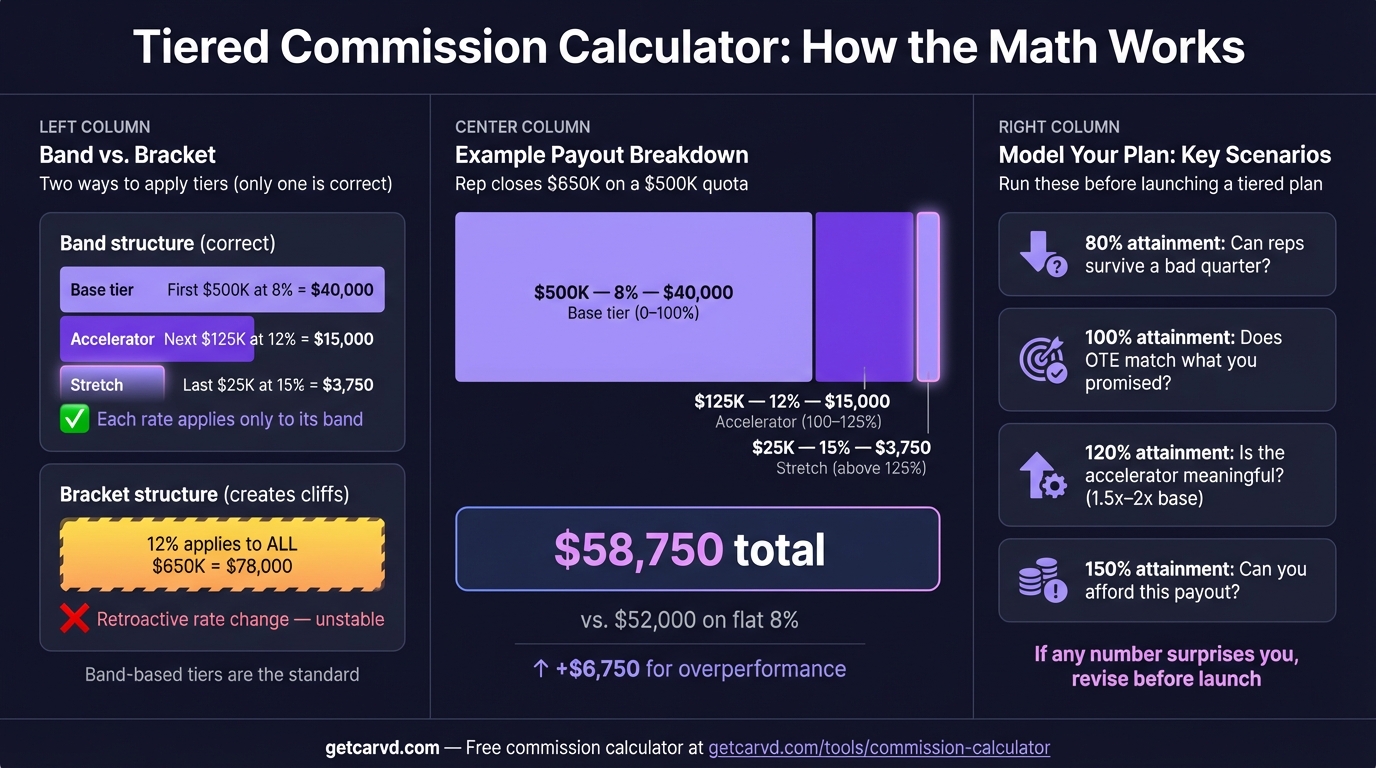
How tiered commission works
A tiered commission plan pays different rates as revenue crosses defined thresholds. The critical rule: each rate applies only to revenue within that tier.
A plan with these tiers:
| Tier | Revenue range | Rate |
|---|---|---|
| 1 | $0–$50,000 | 8% |
| 2 | $50,001–$100,000 | 12% |
| 3 | Above $100,000 | 15% |
...does not pay 15% on all revenue once a rep crosses $100K. It pays 8% on the first $50K, 12% on the next $50K, and 15% only on revenue above $100K. This is the marginal model, and it's the most common structure.
The most frequent calculation error is treating tiered plans like tax brackets and applying the top rate retroactively to all prior revenue. A rep with $130K in closed revenue earns $14,500 under a marginal plan — not $19,500 (which is what applying 15% to everything would produce).
The tiered commission formula
Commission = (Revenue in tier 1 × Rate 1) + (Revenue in tier 2 × Rate 2) + ...
For the three-tier plan above with $130,000 in period revenue:
| Tier | Revenue in tier | Rate | Commission |
|---|---|---|---|
| $0–$50,000 | $50,000 | 8% | $4,000 |
| $50,001–$100,000 | $50,000 | 12% | $6,000 |
| Above $100,000 | $30,000 | 15% | $4,500 |
| Total | $14,500 |
To use the tiered mode in Carvd's calculator: enter each tier's ceiling and rate, then enter the total period revenue. The calculator splits the revenue across tiers and sums the results.
Quota-attainment tiers
Some plans set tier thresholds as percentages of quota rather than dollar amounts. A rep's commission rate depends on where their attainment lands, not on absolute revenue.
A typical attainment-based structure:
| Attainment | Commission rate |
|---|---|
| Below 75% | 7% |
| 75%–85% | 10% |
| 85%–95% | 12% |
| 95%–100% | 15% |
| 100%–110% | 20% |
| Above 110% | 25% |
The marginal rule still applies. A rep at 105% attainment doesn't earn 20% on everything — they earn 7% on the first 75% of quota, 10% on the 75%–85% slice, and so on up to their attainment level.
Worked example:
- Quota: $200,000
- Closed revenue: $210,000 (105% attainment)
| Attainment band | Revenue | Rate | Commission |
|---|---|---|---|
| 0%–75% ($150K) | $150,000 | 7% | $10,500 |
| 75%–85% ($170K) | $20,000 | 10% | $2,000 |
| 85%–95% ($190K) | $20,000 | 12% | $2,400 |
| 95%–100% ($200K) | $10,000 | 15% | $1,500 |
| 100%–105% ($210K) | $10,000 | 20% | $2,000 |
| Total | $18,400 |
If the plan instead paid 20% retroactively on all revenue once the rep crossed 100%, the payout would be $42,000 — more than double. Most plans don't work this way. Retroactive (cliff) tiers exist but are far less common and much harder to model, because a single deal above the threshold changes the entire period's payout. You can compare both models side by side in the commission plan builder to see how each structure affects total payout at different attainment levels.
Accelerator multipliers
Accelerators are a simpler variant: instead of tier brackets, the full commission is multiplied above a threshold.
Example: 1.5x multiplier above 100% quota
A rep with a 10% base rate, $200K quota, and $250K in closed revenue:
- Below quota portion ($200K at 10%): $20,000
- Above quota portion ($50K at 10% × 1.5x): $7,500
- Total: $27,500
Without the accelerator, they'd earn $25,000 flat. The 1.5x multiplier adds $2,500 for the overachievement.
According to QuotaPath benchmarks, 1.5x to 2x is the most common accelerator range. Multipliers above 3x are unusual and can create payout volatility that's hard to budget for.
Marginal vs. retroactive tiers: which does your plan use?
Before calculating, confirm which model your plan uses. The distinction matters significantly above tier thresholds.
| Marginal | Retroactive (cliff) | |
|---|---|---|
| How it works | Each rate applies only to revenue in that bracket | Crossing a threshold changes the rate applied to all prior revenue |
| Predictability | High — small deals don't create large payout jumps | Low — one deal can double total period payout |
| Common? | Yes — standard in most plans | Rare — mostly found in older enterprise plans |
| Dispute risk | Lower | Higher |
If you're not sure which model applies, check whether your plan says "above this tier, the rate applies to all revenue" or "above this tier, the rate applies to additional revenue." The second phrasing indicates marginal tiers.
For more on how tiered structures work in practice, see the tiered commission structure guide.
Common tiered commission mistakes
1. Applying the top rate to all revenue
The most common error. A rep with $130K in revenue on a 3-tier plan earning 8/12/15% calculates $19,500 (130K × 15%). The correct number is $14,500. The discrepancy is a $5,000 dispute waiting to happen.
2. Resetting tiers mid-period
Some plans tie tier thresholds to a single deal rather than period revenue. If a rep closes five $20K deals in Q1, their tiers reset with each deal. If thresholds are cumulative across the period, those deals roll up before crossing any tier. Clarify this before calculating.
3. Ignoring deal-level vs. period-level tiers
Deal-level plans apply tiers per transaction. Period-level plans accumulate revenue and apply tiers quarterly or annually. A 10% tier on deals above $100K and a 10% tier when Q1 revenue exceeds $100K are very different plans.
4. Forgetting to prorate partial months
If a rep joins mid-quarter or a plan changes mid-period, their tier thresholds often need to be prorated. Applying full-quarter thresholds to a half-quarter produces the wrong payout. Carvd's commission calculator handles prorated tiers automatically based on rep start dates and plan effective dates.
Using Carvd to automate tiered calculations
The Carvd commission calculator handles tiered math through the Tiered mode. For teams running these calculations repeatedly across multiple reps and plan types, Carvd's commission tracking software imports deals from HubSpot, Pipedrive, or CSV, applies tiered rules at the rep level, and shows each rep exactly how their number was derived — tier by tier, deal by deal.
For a broader look at commission plan types and how to choose between them, see the sales commission calculator guide or the sales commission structure overview. For a side-by-side comparison of tiered commission tools, see how Carvd compares to ElevateHQ.
Last updated: March 22, 2026